
Last updated on
Oct 2, 2026

CA SB-15148 2013-2026 free printable template
pdfFiller is not affiliated with any government organization

Fill out
Complete the form online in a simple drag-and-drop editor.

eSign
Add your legally binding signature or send the form for signing.

Share
Share the form via a link, letting anyone fill it out from any device.

Export
Download, print, email, or move the form to your cloud storage.
Why pdfFiller is the best tool for your documents and forms


End-to-end document management
From editing and signing to collaboration and tracking, pdfFiller has everything you need to get your documents done quickly and efficiently.
Accessible from anywhere
pdfFiller is fully cloud-based. This means you can edit, sign, and share documents from anywhere using your computer, smartphone, or tablet.
Secure and compliant
pdfFiller lets you securely manage documents following global laws like ESIGN, CCPA, and GDPR. It's also HIPAA and SOC 2 compliant.
What is CA SB-15148
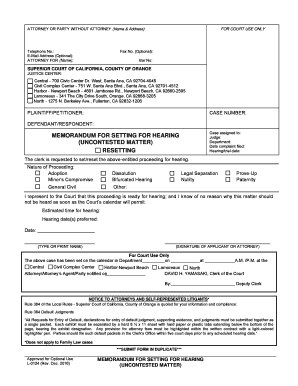
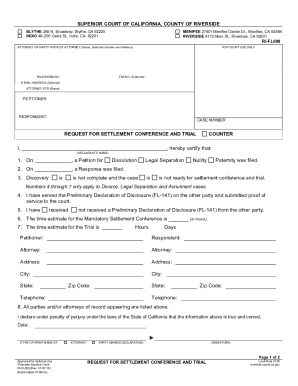
The California Request to Set Uncontested Matter is a legal document used by parties in California to schedule a hearing for uncontested legal matters.
pdfFiller scores top ratings on review platforms




Who needs CA SB-15148?
Explore how professionals across industries use pdfFiller.

CA SB-15148 is needed by:
-
Attorneys representing clients in uncontested matters
-
Unrepresented parties seeking to schedule a hearing
-
Individuals involved in legal separation or dissolution cases
-
People requesting name changes
-
Adoptive parents initiating adoption procedures
Comprehensive Guide to CA SB-15148
What is the California Request to Set Uncontested Matter?
The California Request to Set Uncontested Matter is a legal document used to schedule a hearing for various uncontested legal matters, such as dissolution, legal separation, and name changes. This form plays a critical role within the context of California law, streamlining the process for parties involved in cases without disputes. Its purpose is to expedite court proceedings while clarifying the details surrounding the uncontested nature of these matters.
Purpose and Benefits of the California Request to Set Uncontested Matter
This form significantly aids in streamlining court processes, making it easier for the court to handle uncontested matters efficiently. By utilizing the California Request to Set Uncontested Matter, users can enjoy several benefits:
-
Reduced delays in scheduling hearings.
-
Clear scheduling that minimizes confusion.
-
Facilitation of smoother court interactions.
Who Needs the California Request to Set Uncontested Matter?
The primary users of this form include both attorneys and unrepresented parties seeking to resolve legal matters amicably. To utilize the California Request to Set Uncontested Matter, the following eligibility criteria must be met:
-
The matter must be uncontested.
-
The parties involved should have agreed on the resolution terms.
How to Fill Out the California Request to Set Uncontested Matter Online
Completing the California Request to Set Uncontested Matter online can be achieved through pdfFiller by following these steps:
-
Access the form on the pdfFiller platform.
-
Fill in the required fields, including names of parties involved.
-
Provide relevant case specifics as requested.
-
Review all the entered information for accuracy.
-
Submit the form upon completion.
Common Errors and How to Avoid Them When Submitting the Request
When submitting the California Request to Set Uncontested Matter, users often encounter several common mistakes. To help ensure correct and complete submissions, consider the following tips:
-
Double-check all entered information for accuracy.
-
Avoid omitting signatures or critical dates.
-
Review the submission requirements specific to your court.
Submission Methods for the California Request to Set Uncontested Matter
After completing the form, several submission methods are available for the California Request to Set Uncontested Matter. Options include filing in person at the relevant court or submitting electronically. It's essential to be aware of specific deadlines and processing times associated with each submission method to avoid delays.
What Happens After You Submit the California Request to Set Uncontested Matter
Once the California Request to Set Uncontested Matter is submitted, users can anticipate a series of next steps in the post-submission process. Possible outcomes may include:
-
Scheduling a hearing date.
-
Receiving notifications regarding the status of the request.
Users can track their submissions or check application status through the court's online system or by contacting the clerk of the court.
Security and Compliance When Filing Your California Request to Set Uncontested Matter
When filing legal documents like the California Request to Set Uncontested Matter, data protection and document security are paramount. pdfFiller adheres to strict security measures, including 256-bit encryption, to safeguard sensitive legal documents while ensuring compliance with privacy regulations.
Using pdfFiller for Your Legal Needs
pdfFiller provides a versatile platform for not only completing the California Request to Set Uncontested Matter but also managing various other legal documents. Users can benefit from a range of features such as editing, eSigning, and sharing documents efficiently.
Sample of a Completed California Request to Set Uncontested Matter
To aid users in understanding the form’s layout and fields, a sample of a completed California Request to Set Uncontested Matter is available. Analyzing this example can provide valuable insights into necessary details and enhance comprehension for proper form completion.
How to fill out the CA SB-15148
-
1.Access the California Request to Set Uncontested Matter form on pdfFiller by searching its name in the search bar.
-
2.Open the form once you locate it. Familiarize yourself with the blank fields and checkboxes available for input.
-
3.Before filling out the form, gather all necessary documentation, including case details, party information, and reasons for uncontested status.
-
4.Begin filling in the required information. Use pdfFiller's interface to click on each field and type in your details.
-
5.Ensure that you adequately complete sections like 'Petition/Complaint and Summons were served on' with accurate case information.
-
6.You might also need to check relevant boxes for your particular situation if applicable.
-
7.Once all fields are filled, go back through the form to review each section carefully. Make necessary corrections or additions.
-
8.Finalize the document by adding your signature and the date at the designated area within the form.
-
9.To save your completed form, click the save button. You can also choose to download it as a PDF for physical submission.
-
10.If you are submitting electronically, use the submit feature within pdfFiller to send it to the Clerk of the Court, ensuring it's done at least 10 days before your desired hearing date.

Who needs to file the California Request to Set Uncontested Matter?
This form is typically required by attorneys and unrepresented parties involved in uncontested legal matters, including dissolution, nullity, or legal separation cases in California.
What is the deadline for submitting this form?
The completed California Request to Set Uncontested Matter must be filed with the Clerk of the Court at least 10 days prior to the desired hearing date for it to be valid.
How do I submit the form once completed?
After completing the form on pdfFiller, you can either download it for physical submission or use the submit feature to electronically send it directly to the Clerk of the Court.
Are there any supporting documents I need to include?
Yes, ensure that you have all pertinent documentation regarding your case, including prior filings, that demonstrate the uncontested status of your matter.
What common mistakes should I avoid when filling this form out?
Common mistakes include failing to provide accurate information, neglecting to sign and date the form, and missing the 10-day submission deadline prior to the hearing date.
How long does it take for the court to process this request?
Processing times can vary by court; however, it is important to file at least 10 days in advance to ensure your request for a hearing is accommodated.
What if I have questions while filling out the form?
If you encounter any issues while filling out the California Request to Set Uncontested Matter form on pdfFiller, consult the help section or seek advice from a legal professional for guidance.
CA SB-15148 Form Versions
Related Content
Related Forms




Related Catalogs
Get the latest insights from our blog


If you believe that this page should be taken down, please follow our DMCA take down process
here
.
This form may include fields for payment information. Data entered in these fields is not covered by PCI DSS compliance.